10Scene Store and GeNetix Nodes Lockout 10Scene Wall Plates with Priorities
Please upgrade to V3.1 or higher - take a look at this article.
-
Find the IP of the 10Scene Store or GeNetix node using QuickQ or MagicQ Console or Rack QuickQ via Main Menu, Network Devices, MagicQ via NetManager.
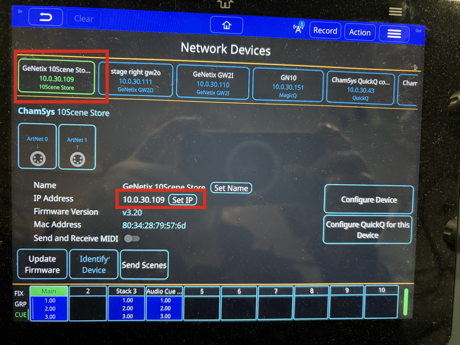
- Connect a computer to the QuickQ network or directly to the 10Scene Store or Node.
- Enter the IP address from #1 in a web browser.
- Navigate to Device Settings, 10 Scene, 10Scene Priority.
- Set to "Below Input."
- Save

Now, when a console outputs DMX to the 10Scene Store or Node over network DMX ACN or Art-Net, the console will be in control because it has priority.
The 10Scene Wall Plates connected to the 10Scene Store or Node will be locked out. Any 10Scene Wall Station button that is active will flash red to indicate it is locked out.
When the console is disconnected or powered off, and no DMX signal is detected at the DMX inputs to the 10Scene Store or networked to the Node, the previously selected scene on the 10Scene Store or Node will be output, and the 10Scene Wall Plates will become active again.